MSI AI Boost提升Intel Core Ultra 285K 17% AI效能
主機板
Intel Core Ultra 200S系列處理器搭載了AI人工智慧處理器NPU (Neural Processing Unit),能夠分擔AI運用的工作負載。
為了再進一步提升AI運算的效能,MSI推出AI Boost功能,只要在BIOS啟動這個功能,就可以提升AI運算效能。MSI AI Boost提供Stage 1, Stage 2和Stage 3三種效能模式,使用者可以依照處理器的體質選擇最佳模式。
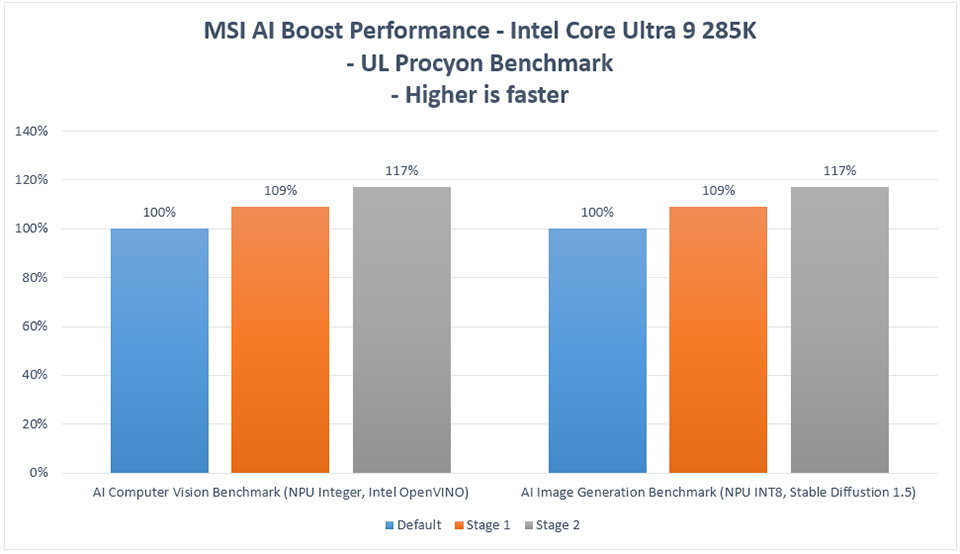
以Intel Core Ultra 9 285K為例,啟動AI Boost功能後,使用UL Procyon AI效能測試工具測試效能,結果顯示在Stage 1模式下,NPU效能可提升約9% ,而使用Stage 2模式,則可提升約17% NPU效能。
為了再進一步提升AI運算的效能,MSI推出AI Boost功能,只要在BIOS啟動這個功能,就可以提升AI運算效能。MSI AI Boost提供Stage 1, Stage 2和Stage 3三種效能模式,使用者可以依照處理器的體質選擇最佳模式。
以Intel Core Ultra 9 285K為例,啟動AI Boost功能後,使用UL Procyon AI效能測試工具測試效能,結果顯示在Stage 1模式下,NPU效能可提升約9% ,而使用Stage 2模式,則可提升約17% NPU效能。
如何啟動MSI AI Boost
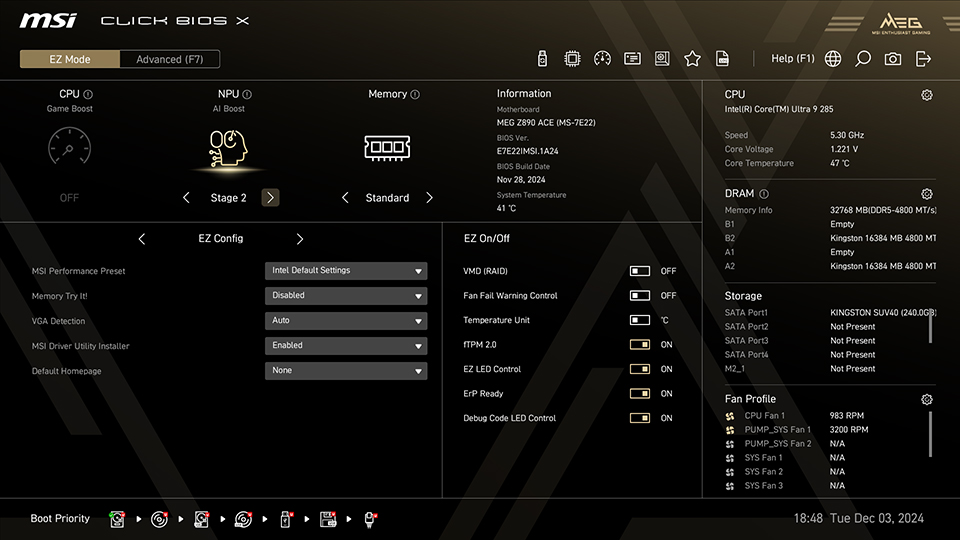
只要進入MSI Click BIOS X,在預設的EZ Mode下,在畫面上方的NPU AI Boost選擇要使用的模式即可。
測試系統配置:
處理器: Intel Core Ultra 9 285K
主機板: MSI MEG Z890 ACE
記憶體: Kingston FURY Beast DDR5-4800 16GBx2
顯示卡: MSI GeForce RTX 4090 SUPRIM X 24G
SSD: Kingston SNV2S/2000G
處理器散熱器: MSI MAG CORELIQUID I360
電源供應器: MSI MEG Ai1300P PCIE5
作業系統: Windows 11 Pro 24H2, build 26100.2314
處理器: Intel Core Ultra 9 285K
主機板: MSI MEG Z890 ACE
記憶體: Kingston FURY Beast DDR5-4800 16GBx2
顯示卡: MSI GeForce RTX 4090 SUPRIM X 24G
SSD: Kingston SNV2S/2000G
處理器散熱器: MSI MAG CORELIQUID I360
電源供應器: MSI MEG Ai1300P PCIE5
作業系統: Windows 11 Pro 24H2, build 26100.2314
*請注意MSI AI Boost會超頻處理器,可能會造成系統不穩定。
MSI Z890主機板: https://tw.msi.com/Landing/intel-arrow-lake-core-ultra-z890-b860-h810-best-ai-pc-gaming-motherboard