MSI GPU Safeguard+ x MSI Afterburner: 電流異常時自動降載,保護你的顯示卡
電腦機殼 & PC周邊
微星最新推出的MPG Ai1600TS PCIE5與MPG Ai1300TS PCIE5電源供應器支援GPU Safeguard+功能,可即時監控12V-2x6個別針腳的電流狀態。當偵測到針腳間電流不平衡時,電源供應器會發出蜂鳴聲警示,MSI Center也會同步彈出警告通知,提醒使用者確認12V-2x6接頭是否確實插妥,線材是否有異常。若電流持續異常未獲改善,電源供應器電源將自動切斷輸出,以保護顯示卡。
除了MSI Center 外,MSI GPU Safeguard+也整合了MSI Afterburner。當偵測到電流平衡異常時,MSI GPU Safeguard+會即時通知Afterburner發出警告訊息,並自動將顯示卡的功耗限制(Power Limit)降低為原本的75%,以保護顯示卡。
電流平衡異常時,降低顯示卡Power Limit
以MPG Ai1600TS PCIE5 1600TS為例,設定方式為:
- 安裝Afterburner後,開啟設定頁面,切換到monitoring分頁,從 ”Data provider” 載入PSU.dll。
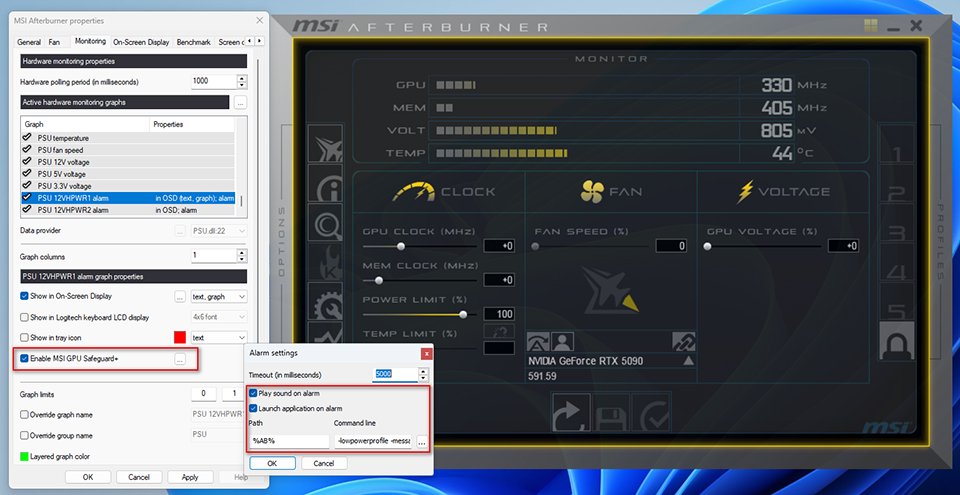
- 在Monitoring分頁下方,選取PSU 12VHPWR1 alarm或PSU 12VHPWR2 alarm,勾選Enable MSI GPU Safeguard+。
- 點擊右側按鈕,勾選Load Application on alarm,再點擊 Command Line右下方的按鈕,載入Afterburner預設提供的設定檔lowpowerprofile。
完成設定後,當電源供應器偵測到電流異常,GPU Safeguard+ 會觸發電源供應器蜂鳴聲警示,同時通知Afterburner套用lowpowerprofile設定,自動將顯示卡Power Limit降低為75%。
註:
- MPG Ai1600TS PCIE5 1600TS提供兩組12V-2x6接頭,若僅使用其中一組,請確認使用的接頭與Afterburner的PSU 12VHPWR1 alarm / PSU 12VHPWR2 alarm正確對應。
- 請安裝MSI Afterburner v.4.6.7或更新的版本以支援MSI GPU Safeguard+功能。
- 除了使用MSI Afterburner內建的lowerpowerprofile外,使用者也可以自訂要執行的設定檔。
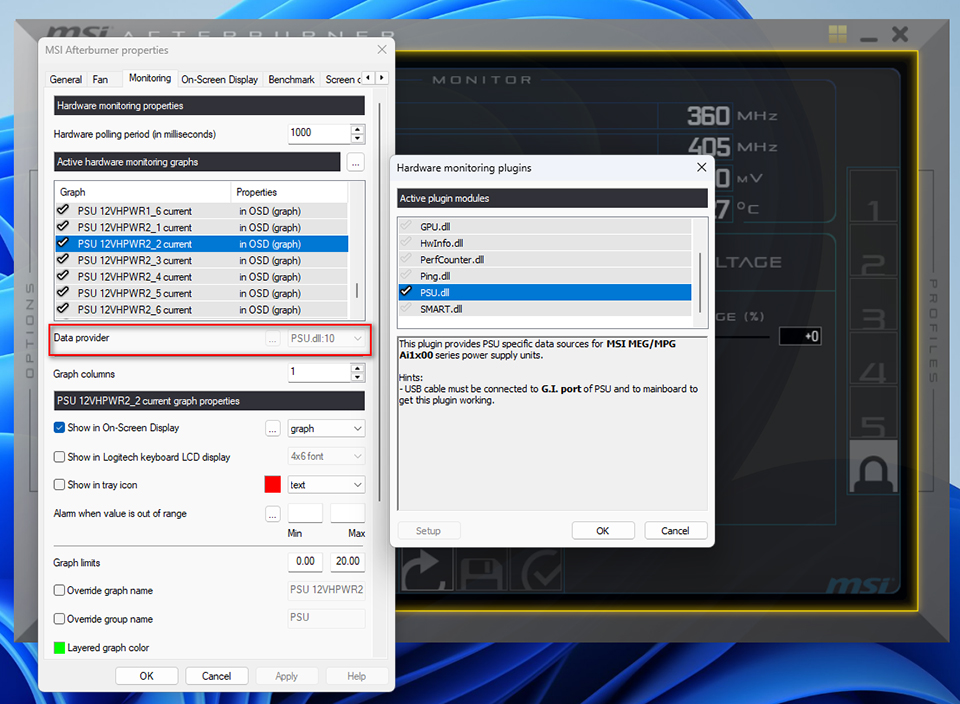
▲ 在Monitoring分頁啟用MSI GPU Safeguard+後,當12V-2x6各針腳電流不均時,將自動執行顯示卡降載保護。
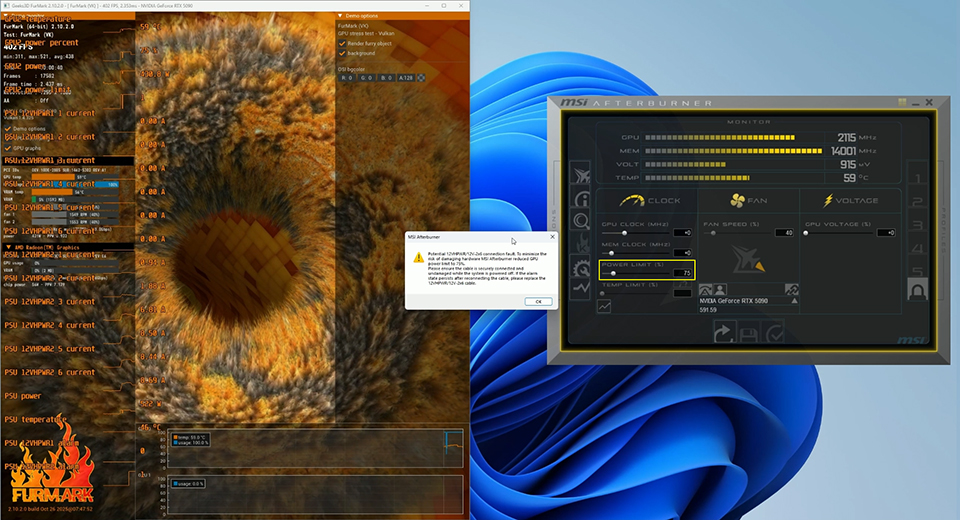
▲ 偵測到12V-2x6針腳間的電流差異過大時,MSI GPU Safeguard+會通知Afterburner降低顯示卡Power Limit。
MSI GPU Safeguard+ 支援清單:
- MPG Ai1600TS PCIE5: https://tw.msi.com/Power-Supply/MPG-Ai1600TS-PCIE5
- MPG Ai1300TS PCIE5: https://tw.msi.com/Power-Supply/MPG-Ai1300TS-PCIE5
- https://tw.msi.com/Landing/afterburner/graphics-cards