MSI Memory Extension Mode提升Intel Core Ultra 9 285遊戲效能
主機板
Intel B860晶片組雖不支援處理器超頻,但支援記憶體超頻,所以使用者可以透過XMP或MSI的 Memory Try It! 來超頻記憶體,提升效能。
如果再搭配MSI Memory Extension Mode最佳化記憶體參數,則可再提升效能和降低延遲。
如果再搭配MSI Memory Extension Mode最佳化記憶體參數,則可再提升效能和降低延遲。
MSI Memory Extension Mode – 優化參數,降低延遲
MSI Memory Extension Mode透過優化記憶體參數,達到降低延遲、提升記憶體和遊戲效能的目的。Memory Extension Mode提供Performance、Benchmark和Memtest三種模式,讓使用者能夠根據他們的需求和記憶體超頻體質,快速找出最佳設定。
MSI Memory Try It! – 一鍵超頻記憶體
MSI Memory Try It! 可以根據使用的記憶體顆粒,提供多組頻率和參數搭配的超頻設定,讓使用者快速找出最適合的超頻組合。
MSI Memory Try It! DDR5-8000 + Memory Extension Mode – 遊戲效能快16%
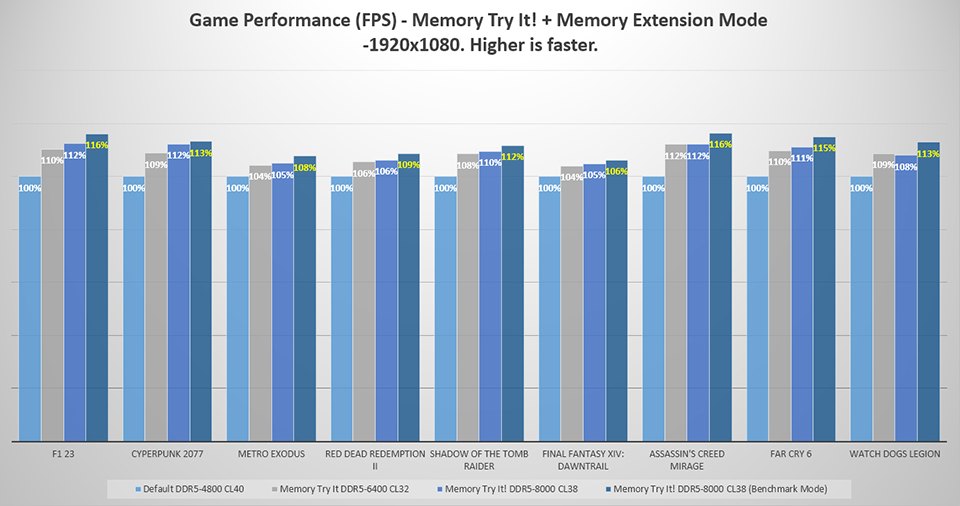
使用Intel Core Ultra 9 285,搭配Memory Try It! 將記憶體超頻到DDR5-6400與DDR5-8000,再搭配Memory Extension Mode,測試結果顯示,相較於預設的DDR5-4800可以提升6-16%遊戲效能。
如果單獨比較Memory Extension Mode開啟與否的效能,在DDR5-8000時,開啟Memory Extension Mode比未開啟時提升1-5% 遊戲效能。
如果單獨比較Memory Extension Mode開啟與否的效能,在DDR5-8000時,開啟Memory Extension Mode比未開啟時提升1-5% 遊戲效能。
如何開啟MSI Memory Extension Mode
進入BIOS後預設會進入EZ Mode,按下F7按鍵進入Advanced Mode以後,可以在Overclocking頁面看到Memory Extension Mode選項,從選單選取要使用的模式即可。
測試系統配置
處理器: Intel Core Ultra 9 處理器285
主機板: MSI MAG B860 TOMAHAWK WIFI
記憶體: Galax DDR5-7200 16GBx2
顯示卡: MSI GeForce RTX 4090 SUPRIM X 24G
SSD: Kingston SNV2S/2000G
處理器散熱器: MSI MAG CORELIQUID I360
電源供應器: MSI MEG Ai1300P PCIE5
作業系統: Windows 11 24H2 (Power Mode: Best Performance)
遊戲設定: 最高畫質設定
主機板: MSI MAG B860 TOMAHAWK WIFI
記憶體: Galax DDR5-7200 16GBx2
顯示卡: MSI GeForce RTX 4090 SUPRIM X 24G
SSD: Kingston SNV2S/2000G
處理器散熱器: MSI MAG CORELIQUID I360
電源供應器: MSI MEG Ai1300P PCIE5
作業系統: Windows 11 24H2 (Power Mode: Best Performance)
遊戲設定: 最高畫質設定
註:
- 效能會依據使用的硬體與設定而有不同
- 本測試使用RTX 4090顯示卡,效能提升效果會因顯示卡不同而異
- Memory Try It! 與Memory Extension Mode牽涉到記憶體超頻,穩定性會因硬體而異
- 記憶體效能對遊戲的效能的提升因遊戲與使用的顯示卡而異
MSI Z890/B860/H810系列主機板: https://tw.msi.com/Landing/intel-arrow-lake-core-ultra-z890-b860-h810-best-ai-pc-gaming-motherboard